Category Archives: Thoughts on the World

Twin Tales of Sporting Daring-Do

The 1988 Winter Olympics brought us not only one, but two heart-warming stories of sporting heroism by unconventional outsiders. The story of the Jamaican Bobsleigh Team was told promptly in the wonderful 1993 Disney picture Cool Runnings, but we’ve had to wait nearly 30 years to see the other tale, that of Eddie the Eagle, on the silver screen.

Part of the challenge is that the dramatic conventions of such films force their screen renderings to be quite similar. In reality the situations were somewhat different. Until the wheels (or at least the runners) literally came off the Jamaicans had built up a real prospect of a good place, powered by a team three of whom could run 100m in less than 10s. Eddie Edwards had his utter determination to take part, and had built up a decent competition record on skis, but was only ever likely to come last. The new film acknowledges this, but otherwise echoes the earlier one in many ways, with the same drunk and disgraced former athlete as coach, the condescending officials who see the outsiders as challenging the dignity of their sport, parents who are split on whether to support their sons or not, fellow athletes who are initially rude but who come to respect the outsiders’ determination, and so on.

When two films, by co-incidence , tackle the same subject at the same time it’s inevitable that they are compared and one (Deep Impact, Olympus Has Fallen) falls into the shadow of the other (Armageddon, White House Down). While I get the impression that the makers of the new film didn’t want to wait nearly a generation to make it, maybe by doing so they have both reduced this effect (except from old codgers like yours truly), and will perpetuate these great sporting tales into a new audience who might not otherwise have been aware of them.

Comparisons and conventions aside, Eddie the Eagle is an excellent film. It captures both the flights and thumps of ski jumping, and modern filming techniques allow you to be there on the skis with the jumpers. However it excels in telling the human stories, with Edward’s determination against the odds beautifully portrayed, as is the growing admiration of those who both supported and opposed him. I have two abiding memories of the Calgary Olympics. One is of four black guys carrying their broken bobsleigh over the finish line, and the other is of an interview about Eddie with the slightly cold and aloof Finnish ski-jumping champion Matti Nykänen who the reporter was expecting to be rude and dismissive. Instead the young Finn was warm and supportive of Edward’s right to be there, and pretty much put the seal of approval on his attempt at the 90m hill. In the film that same support is portrayed in an elevator conversation between the two men, and brought my memories flooding back.

The film is also very funny, and that triggered another personal element. We went to see it yesterday in Guildford, and a large extended family had clearly block-booked the central seats next to ourselves. I noticed that when the same writer’s name was shown twice in the credits, there was a little Mexican wave by the kids, and thought "oh, that Simon Kelton must have someone in", but then sat down to enjoy the film and laughed as loud as I normally do when so entertained. Afterwards, one of the family group came up to me and asked "was it you who was laughing so loudly?" I confirmed that it was, and he introduced himself as the writer. It’s not often I can personally express my thanks to an entertainer, and it was great on this occasion to get the chance.

It’s a good film. Go and see it. And afterwards, try and catch up with Cool Runnings.

Posted in Reviews, Thoughts on the World | Leave a comment

Backing Up

On the caldera path, Firostephani, Santorini
Camera: Panasonic DMC-GX8 | Date: 04-10-2015 18:45 | Resolution: 4963 x 3722 | ISO: 500 | Exp. bias: 0 EV | Exp. Time: 1/60s | Aperture: 7.1 | Focal Length: 15.0mm | Location: Santorini | State/Province: South Aegean | See map | Lens: LUMIX G VARIO 12-35/F2.8

Coming up with a reliable backup policy is a challenge as data volumes grow. My approach is as follows. On a weekly basis I do a full backup of the system disk of the more "volatile" PCs in our collection, plus a differential backup of the other disks. The best tool for full backups appears to be Acronis, but it has a brain-dead approach to partial backups, which cannot always be restored if you don’t have every file in the chain, and it’s just not reliable enough. I therefore also continue to use the venerable Windows ntbackup, even under Windows 10, as I still haven’t found a better option which supports a true "differential" model.

Every three or four months I then do a full backup of every disk in every PC, and re-set the baseline for the differential backups. That’s due for this weekend, and as a result I’m trying to finish processing images from some previous trips, so they will be fully backed up in their complete form. I have about 100 images from Santorini to process today, and then I get to a very neat breakpoint. I’m not sure whether such a deadline really helps, but at least it drives me to keep my photography backlog under control.

The picture above is mainly just to provide a bit of colourful cheer on a damp and windy February morning. Enjoy it!

View featured image in Album
Posted in PCs/Laptops, Photography, Santorini, Thoughts on the World | Leave a comment

Snap!

Echoes: screenshot from my Android tablet
Resolution: 1600 x 2249

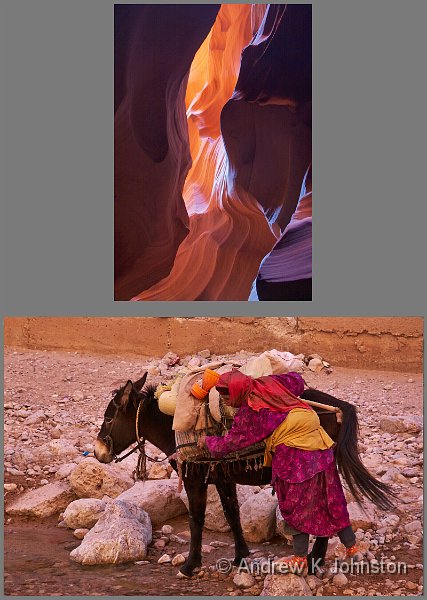
As you know, I enjoy looking for patterns and coincidences. One potential source is the various ways I display my photo portfolios, and I occasionally spot the screensavers on two devices, for example, showing related images. This is interesting, but essentially fleeting – a moment to be enjoyed before the randomisers roll on.

However, last night I spotted one which I not only could, but thought I should share. On one page of my Android tablet I display two randomly selected images, and when I flicked through it I spotted this combination. The top image is from Antelope Canyon in Arizona, the bottom is a shepherdess in Morocco. Not only are the colour palettes almost identical, but in some ways the woman’s body position echoes the curves of the rock. Intriguing.

View featured image in Album
Posted in Photography, Thoughts on the World | Leave a comment

Weinberg’s New Law, and the Upgrade Cascade

When I started the experiment of running Windows on a MacBook (continued here and here), I really expected it to just be a "travel" laptop, continuing with something like my Alienware R17X as primary machine. That changed rapidly when I got addicted to the MacBook’s better weight, format, screen and, it must be admitted, style. However originally I had purchased a relatively low spec second-hand MacBook, in particular without a Retina screen, and I promised myself an upgrade at some point. On the Bhutan trip I got to play with the newer, lighter, MacBooks some of the others were using, and with the end of my financial year approaching, over Christmas I decided to go for it.

The purchase process was "non-trivial" (polite version). To get the performance improvement I wanted, I was attracted to the top-spec model of the latest MacBook Pro. A bit of research also established that I didn’t have much choice: the new MacBooks use a new SSD technology which is not yet fully supported by the parts market, and only the higher spec machines have a 1TB disk to match my older machine. Purchasing a brand new MacBook is not for the faint hearted: full price from Apple they are bloody expensive. Even allowing for inflation the MacBook is about 35% more than my Alienware laptop (itself a custom-built machine of then-equivalent spec) was in late 2011. And this is supposed to be a market with downwards price pressure!

I decided to look for alternative options. At first I thought I’d cracked it with someone selling a refurbished item via Amazon, but when it turned up it was completely the wrong spec, including a Spanish keyboard. Amazon and the vendor were both very helpful and a refund was arranged promptly, but neither could help regarding providing the item I actually wanted, so that was a dead end. On eBay there are few options, but making enquiries they are mainly "grey market" imports which are just dodging the VAT, which doesn’t help me. However persistence paid off and I finally found an affordable deal for a brand new MacBook which came with a proper VAT receipt, bringing the effective price nearer what I’ve normally paid. I would happily recommend the very helpful suppliers, TRDuk Ltd.

Then the "fun" started!  The famous American consulting guru, Gerald Weinberg, wrote his advice in terms of a number of "laws". The shortest and simplest is The New Law, which simply states "Nothing new works". Unfortunately, as many of us know, he’s right. There’s an inevitable bedding-in period with most new technology, during which we get to know and understand it, and get it set up correctly. So it was with the laptop.

I lost a couple of days trying to find a short-cut to the set-up/rebuild process. Although the new machine has no DVD drive, I managed to find an old USB one, plus there are some fairly well-established routines for building bootable memory sticks. However Apple have changed the architecture of the 2014+ MacBooks so much they won’t boot natively from a Windows installer or Acronis backup disk, and in El Capitan they have removed the ability to build native Windows boot installer media under BootCamp. That eventually put paid to any attempt to restore a copy of my installation on the older MacBook, or to install Windows onto a blank disk. It also become apparent that Apple no longer provide driver support for Windows 7, so I was going to have to bite the bullet and install Windows 10, and under a BootCamp installation. When I tried that on the older MacBook it left the disk in a very inflexible state, but somewhere between Apple and Microsoft the former problems had gone away, and Windows 10 and appropriate hardware drivers installed very nicely. The only side-effect is that there’s a 40GB OSX partition (which for some reason is now unbootable) stealing a bit of disk space, but I can live with that for now.

This is the point to introduce Johnston’s Even Shorter Corollary to Weinberg’s New Law: "Upgrades Cascade". We’ve all see this, a new X means upgrading Y, which means upgrading Z. In addition, Microsoft’s core products are definitely now on the Slippery Slope of Unnecessary Enhancement of the Software Utility Curve. Windows 10 has a number of definite capability reductions compared with Windows 7, and so far I’m really struggling to find any real "Wow, that’s a definite improvement" to compensate.

The rot set in quite early in the process. All versions of Windows since 2000 have included a version of the Files and Settings Transfer Wizard (it’s had a few different names). By Windows 7 this was quite powerful, and, for example, successfully transferred all my Office add-ins to the first MacBook without problems. However, when I say "all versions", I mean "all versions except Windows 10". For reasons which are not explained, Microsoft have dropped this essential utility, replacing it with a free subscription to a Laplink service which just isn’t as good. Not only does it ignore anything which looks like it might be program-related (unless you are prepared to pay them extra money), it also missed a few files and settings which I’m sure transferred without problems in earlier moves. To add annoyance it only works over the network, which is both slow (especially as I was only able to use WiFi at this stage), and wouldn’t work in all environments.

Although Windows 10 is massively better than the almost-unusable Windows 8.x, it still has some user interface oddities which are a definite downgrade from earlier versions. The most annoying of these relate to the settings functionality, which is doubly troublesome as this is something you need to work cleanly and reliably early in the cycle of setting up an operating system. The preferred settings architecture consists of a series of allegedly touch-friendly "overlays" on a sort of "web page" paradigm. However, it doesn’t work very well. Key settings are buried in illogical places, and there’s no clear way to confirm/cancel/reset changes, which I would have thought is fundamental. The worst aspect is the "brain dead" implementation of Windows Update, which loses its context if you switch away to inspect another setting while it’s running, and has to start again. There’s also no way to download updates but install them at a convenient time, or any of the other management features of the Windows 7 system. Worse, in an effort to provide a "cool" interface this page has no scroll bars on the update list, so unless you deliberately try and navigate with the mouse you have no way to see whether there are just 5 updates waiting, or you are just looking at the top 5 of 100!

What I discovered fairly quickly, however, is that Control Panel, and most if not all of the applets, are still present and work well. They are well hidden, but if you type the appropriate name into Cortana you can get a shortcut and put it on the desktop (or into XStart, which still, thankfully, works well under Windows 10, unifying launch across all my PCs). That doesn’t help where Microsoft have fundamentally redesigned the settings architecture, such as with language and keyboard management, and there’s no "Windows Update" fix, but otherwise it’s much better. It’s also a nuisance that Microsoft have removed the straightforward one-click on the desktop way to change screen resolution, but a shortcut to the "Display" control panel is a reasonable fix and much better than trying to use the appalling standard settings page.

Remote desktop, of which I make extensive use, doesn’t work as well with a Windows 10 target as with older versions, with much more limited functionality around display and power management. There are some usable work-arounds on the web, but like the loss of the one click to change display resolution, this is a case of breaking something which previously worked fine.

In fairness to Microsoft, beyond the settings the software annoyances have been relatively few. I use the excellent Windows Live Writer for blogging, and was disappointed to find initially that I could no longer download it, having to settle for a currently inferior open source version. However today I’ve resolved that and got Live Writer running again. I had to upgrade a couple of small applications, and install others in compatibility mode, but no major problems. The one application which seems less tractable is Apache, which was a pig to install even under 64 bit Windows 7. My solution there is to run it in a Windows XP VM, but taking the content files from the disk of the main machine, which is what I’ve done with some other legacy apps. There are a couple of wrinkles to iron out, but essentially it works.

There were a few annoyances in terms of the hardware and drivers, but nothing insuperable. The native resolution of the MacBook Retina screen, 2880×1800, is unusable under Windows, and I expected that I’d probably run most of the time at exactly half that, 1440×900, which would be the same as native on the older machine. It was a good plan, let down by the completely inexplicable absence of built-in support for 1440×900 in the AMD drivers! Fortunately they support "custom resolutions" (although it’s by no means obvious how), and after a little bit of googling and registry editing 1440×900 was duly added to the list and works exactly as expected. Now we just need to shoot the 16 year old with hawk eyes who doesn’t get the requirement… The lack of built in ethernet support is also a pain, especially as due to a separate minor procurement problem my thunderbolt to ethernet adapter didn’t turn up on time and I had to do all the main set up using WiFi. Now I appreciate that the MacBook is so thin that it cannot support a full-sized RJ45 port, but at the price you pay why can’t Apple include a thunderbolt adapter in the box?

Minor annoyances aside, the good news is that I really like the Mac hardware. It’s very fast, with Windows boot to login taking no more than 10s and login processing not much more again. Battery life is excellent at 5-6 hours of office work. The keyboard is identical to its predecessor, and accepted the same bodges to make it work well with Windows without problems. The real gain however is the Retina display, which is brilliant in terms of colour consistency, and viewing angle tolerance. Why have only Apple cracked this? It’s arguably not quite as sharp or bright as the non-Retina display of the older machine at its native 1440×900, but the difference is negligible and the improved colour accuracy more than makes up for it.

So where does this leave us? The MacBook is still a great, and improved "PC", but so it should be at the price, and that’s despite Apple trying hard to make it more difficult to run Windows than it used to be. Windows 10 is OK, but that’s damning with faint praise, with no real improvement that I’ve yet spotted, and some things definitely downgraded. A former senior designer at Apple and usability guru, Bruce Tognazzini, recently wrote a piece blasting  current Apple design for prioritising "beauty" over utility (How Apple Is Giving Design A Bad Name), and there’s obviously more than an element of the same in Microsoft’s copy-cat actions. Can we have a bit more focus on "easy to use professionally (by users of all ages and physical abilities)" and a bit less "make it look pretty to appeal to teenagers" from both companies, please?

Oh, and the best news? The big Alien is going on eBay, and early indications suggest that it’s worth more than half what I paid for it. Not bad for a machine more than 4 years old, and a challenge for the new MacBook to live up to…

Posted in PCs/Laptops, Thoughts on the World | Leave a comment

Platform Flexibility – It’s Alive!

The last post, written largely back in November and published just before Christmas suggested that camera manufacturers should focus on opening up their products as development platforms, much as has happened with mobile phones. While I can’t yet report on this happening for cameras, I now have direct experience of exactly this approach in another consumer electronics area.

I decided to replace a large picture frame in my office with a electronic display, on which I could see a rolling presentation of my own images. This is not a new idea, but decreasing prices and improving specs brought into my budget the option of a 40"+ 4K TV, which on the experience of our main TV should be an excellent solution.

New Year’s Eve brought a trip to Richer Sounds in Guildford. As usual the staff were very helpful and we quickly narrowed down the options to equivalent models from Panasonic or Sony. The Panasonic option was essentially just a smaller version of our main TV, but the colours were slightly "off" and we preferred the picture quality of the Sony. The Panasonic’s slideshow application is OK, but limited, but the Sony’s built-app looked downright crude. It looked like a difficult choice, but then I realised that the Sony operating system is something called "AndroidTV" with Google Play support, and promised the option of a more open platform, maybe even development myself. Sold!

In practice, it’s exactly as I expected. The basic hardware is good, but the Sony’s default applications beyond the core TV are a bit crude. However a bit of browsing on Google Play revealed a couple of options, and I eventually settled on Kodi, a good open-source media player, which does about 90% of what I want for the slideshow. Getting it running was a bit fiddly, not least because a key picture-handling setting has to be set by uploading a small XML file rather than via the app’s UI, but after only a bit of juggling it’s now running well and doing most of what I want.

Beyond that, I can either develop an add-on for Kodi, or a native application for AndroidTV. However as the existing developer community has provided a 90% solution, I’m not in a great hurry.

I call that a result for platform vs product…

Posted in Agile & Architecture, Android, Code & Development, Photography, Thoughts on the World | Leave a comment

Do We Want Product Development, or Platform Flexibility?

There’s been a bit of noise recently in the photography blogosphere relating to how easy it is to make changes to camera software, and why, as a result, it feels like camera manufacturers are flat out not interested in the feature ideas of their professional and more capable enthusiast users. It probably started with this article by Ming Thein, and this rebuttal by Kirk Tuck, followed by this one  and this one by Andrew Molitor.

The problem is that my "colleagues" (I’m not quite sure what the correct collective term is here) are wrong. For different reasons. They are all thinking of the camera as a unitary product, and none of them (even Molitor, who claims to have some experience as a system architect) are thinking as they should, of the camera as a platform.

OK, one at a time, please…

There are a lot of good ideas in Ming Thein’s article. A lot of his suggestions to improve current mirrorless cameras are good ones with which I agree. The trouble is that he is trying to design "Ming Thein’s perfect camera", and I suspect that it wouldn’t be mine. For a start it would end up far too heavy, too expensive and with too many knobs!

Kirk Tuck gets, this, and his article is a sensible exploration of trade-offs and how one photographer’s ideal may be another’s nightmare. However he paints a picture of flat-lining development which is very concerning, because there are some significant deficiencies in current mainstream cameras which it would be great to address.

Andrew Molitor then picks up this strand, and tries to explain why all camera feature development is difficult, and prohibitively expensive, and why Expose to the Right (ETTR) is especially difficult. Set aside that referring to Michael Reichmann as "a pundit" is unkind and a considerable underestimation of that eminent photographer’s capabilities, there are several fallacies in Molitor’s articles. Firstly, it just would not be as difficult as claimed to implement ETTR metering, or any variant of it. It’s just another metering calculation. If you have a camera with some form of live histogram or overexposure warning, then you can already operate this semi-manually, tweaking down the exposure compensation until the level of clipping is what you want. If you can do it via a predictable process, then that enormously powerful computer you call a digital camera can easily be made to replicate the same quickly and efficiently. That’s what the metering system does. It’s even quite likely that the engineers have already done something similar, but hidden it. (Hint: if you have a scene mode called something like "candle-lit interior", you’re almost there…)

I suspect the calculations of grossed-up cost are also fallacious. If that were the case, in a market which manages US sales of only a few tens of thousands of mirrorless cameras per year (for example), we would never get any new features at all. The twin realities are that by combining multiple features into the normal streams of product or major release development, many of the extra costs are amortised, but we also know that the big Japanese electronics companies apply different accounting standards to development of their flagship products. If Molitor’s argument was correct, we would not see features in each new camera such as a scene mode for  "baby’s bottom on pink rug" (OK, I made that one up :)) or in-camera HDR, and things like that don’t seem to be a problem. I simply cannot believe that "baby’s bottom on pink rug" will generate millions of extra dollars revenue, compared with a "control highlight clipping" advanced metering mode, which would be widely celebrated by almost all equipment reviewers and advanced users.

So assuming that I’m right, and on-going feature development is both feasible and desirable, where does that leave us?

Ming Thein is not alone in expressing disappointment with the provision of improved features focused for the advanced photographer, and I agree with him that the slow progress is really very annoying. In my most recent review, I identified several relatively simple features which would be of significant value to the advanced photographer, and which could easily be implemented in the software of any good mirrorless camera without hardware changes, including:

  1. Expose to the right or other "automatically control highlight clipping" metering
  2. Optimisation for RAW Capture (e.g. histogram from RAW, not JPG)
  3. Proper RAW-based support for HDR, panoramas, focus stacking and other multishot techniques
  4. Focal distance read-out and hyperfocal focus
  5. Note taking and other content enrichment

All of these have been identified requirements/opportunities since the early era of digital photography. Many of them are successfully implemented in a few, perhaps more unusual models. For example the Phase One cameras implement a lot of the focus-related features, the Olympus OM-D E5-II does a form of image stacking for resolution enhancement, and Panasonic have just introduced a very clever implementation of focus bracketing in the GX8 based on a short 4K burst. However by and large the mainstream manufacturers have not made any significant progress towards them.  Even if Molitor’s analysis is correct, and this is all much more difficult than I expect (despite my strong software development experience) you would think that over time there would be at least some perhaps limited visible progress, but no. If the concepts were really "on the product backlog" (to use the iterative development term), then some would by now have "made the cut", but instead we get yet more features for registering babies’ faces…

My guess is that some combination of the following is going on:

  • The "advanced photographer" market is relatively small, and quite saturated. Camera manufacturers are therefore trying to make their mid-range products attractive to users who would previously have bought a cheaper device, and who may well consider just using a phone as an option. To do this, the device needs to offer lots of "ease of use" features.
  • Marketing and product management groups are focused on the output of "focus groups", which inevitably generate lowest-common denominator requirements which look a lot like current capabilities.
  • Manufacturers are fixated on a particular set of use cases and can’t conceive that anyone would use their products in a different way.

The trouble is that this leaves the more experienced photographers very frustrated. The answer is flexibility. By all means offer an in-camera, JPG-only HDR for the novice user, but don’t fob me off with it – offer me flexible RAW-based multishot support as well. Re-assignable buttons are a good step in the right direction, but they are not where flexibility begins and ends. The challenge, of course, is to find a way to provide this within fixed product cycles and limited budgets.

I think the answer lies with software architecture, and in particular how we view the digital camera. It’s time for us all, manufacturers and advanced users alike, to stop thinking of the camera as a "product", and start thinking of it as a "platform", for more open development. In this model the manufacturer still sells the hardware, complete with basic functionality. Others extend the platform, with "add-ins" or "apps", which exploit the hardware by providing new ways to drive and exploit its capabilities.

We’ve been here before. In the early noughties, mobile phone hardware had evolved beyond all recognition (my first mobile phone was a Vodafone prototype which filled one seat and the boot of my Golf GTI, and needed a six-foot whip antenna!) However, you bought your phone from Nokia, for example, and it did what it did. If you didn’t like the contact management functionality, you were stuck with it.

Then Microsoft, followed more visibly by Apple and eventually Google, broke this model, by delivering a platform, a device which made phone calls, sure, but which also supported a development ecosystem so that some people could develop "apps", and others could install and use those which met their needs. Contact management functionality is now limited only by the imagination of the developer community. Despite my criticism of some early attempts, the model is now pretty much universal, and I don’t think I could go back to a model where my phone was a locked-down, single-purpose device.

The digital camera needs to go the same way, and quickly before it is over-run by the phone coming at the same challenge from the other side. Camera manufacturers need to stop thinking about "what other features should we develop for the next camera", and instead direct themselves to two questions, one familiar and one not. The familiar one is, of course, "how can we make the hardware even better"? The unfamiliar one is "how can we open up this platform so that developers can exploit it, and deliver all that stuff the advanced users keep going on about"?

Ironically, for many manufacturers many of the concepts are in place, just not joined up. The big manufacturers all offer open lens mounts, so that anyone can develop lenses for their bodies. In the case of Panasonic, Olympus and the other micro-four thirds partners it’s even an open multi-party standard. Panasonic certainly now deliver "platform" televisions with the concept of third party apps. There’s a healthy community of "hackers" developing modified firmware for Canon and Panasonic cameras, albeit at arms length from and with a slightly ambivalent relationship to the manufacturers. I’m sure many of those would very much prefer to be working as partners, within an open development model.

So what should such a "platform for extensibility" look like? Assuming we have a high-end mirrorless camera (something broadly equivalent to a Panasonic GX8) to work with as base platform, here are some ideas:

  1. A software development kit, API and "app store" or similar for the development and delivery of in-camera "apps". For example, it should be possible to develop an ETTR metering module, which the user can choose as an optional metering mode (instead of standard matrix metering). This would be activated in place of the standard metering routine, take in current exposure, and return required exposure settings and perhaps some correction metadata. Obviously the manufacturer would have to make sure that any such module returned "safe" values, but in a mirrorless camera it should be very easy to check that the exposure settings are "reasonable" and revert to a default if not. Other add-ins could tap into events such as the completion of an exposure, or could activate functions such as setting focal distance. The API should either be development language-agnostic, or should support a well-known language such as Java, C++ or VB. That would also make it easier to develop an IDE (exploiting Visual Studio or Eclipse as a base), emulators and the like. There’s no reason why the camera needs an "open" operating system.
  2. An SDK for phone apps. This might be an even easier starting point, albeit with limitations. Currently manufacturers such as Panasonic provide some extended functions (e.g. geotagging) via a companion app for the user’s phone, but these apps are "closed", and if they don’t do what you want, that’s an end of it. It would be very easy for these manufacturers to open up this API, by providing libraries which other developers can access. My note taking concept could easily be delivered this way. The beauty of this approach is that it has few or no security issues for the camera, and the application management infrastructure is delivered by Google, Apple and Microsoft.
  3. An open way to share, extend and move metadata. Panasonic support some content enrichment, but in an absolutely nonsensical way, as those features only work for JPEG files. What Panasonic appear to be doing is writing to the JPEG EXIF data, but not even copying to the RAW files. The right solution is support for XMP companion files. These can then accompany the RAW file through the development process, being progressively enhanced by different tools, and relevant data will be permanently written to the output JPEG. This doesn’t have to be restricted to static, human-readable information. If, for example, the ETTR metering module can record the difference between its exposure and the one set by the default matrix method, then this can be used by the RAW processing to automatically "normalise" back to standard exposure during processing. XMP files have the great advantages that they are already an open standard, designed to be extensible and shared between multiple applications, and it’s pretty trivial to write code to manipulate them, so this route would be much better than opening up the proprietary EXIF metadata structures.
  4. A controllable camera. What I mean by this is that the features of the camera which might be within the scope of the new "apps" must be set via buttons, menus and "continuous" controls (e.g. wheels with no specific set positions), so that they can be over-ridden or adjusted by software. They must not be set by fixed manual switches, which may or may not be set where the software requires. The Nikon DF or the Fuji XT1 may suit the working style of some photographers – that’s fine – but they are unsuited to the more flexible software environment I’m envisaging. While I prefer the ergonomics of "soft" controls, in this instance they are also a solution which promotes flexibility, which is what we’re seeking to achieve here.

This doesn’t have to be done in one fell swoop, and it might not be achieved (or even appropriate) 100% for every camera. That’s fine. Panasonic, for example, could make a great start by opening up the "Image App" library, which wouldn’t require any immediate changes to the cameras at all.

So how about it?

Posted in Agile & Architecture, Code & Development, Photography, Thoughts on the World | Leave a comment

From Nobgang to Bumthang…

Yak at the top of the Pelela Pass
Camera: Panasonic DMC-GX8 | Date: 20-11-2015 10:57 | Resolution: 3575 x 3575 | ISO: 400 | Exp. bias: -33/100 EV | Exp. Time: 1/640s | Aperture: 8.0 | Focal Length: 300.0mm | Lens: LUMIX G VARIO 100-300/F4.0-5.6

Via Nobding (with more phalluses) – I couldn’t make this up if I tried!

Today was essentially a very long and somewhat boring drive, to the “alpine” bit of Bhutan. Although start and end are probably only 50km apart as the crow flies, the road takes 200km as it hugs the sides of the very steep valleys, and crosses 3 passes all well over 3000m. On a normal day, the bus trip takes at least 10 hours (an average of about 20kph, including stops).

However, to make things significantly worse the Bhutanese have initiated a completely crazy programme of road improvement, which really isn’t working and slows everything down even further. At least 70% of the route is currently "undergoing widening", but rather than having a few moderate to large teams focusing on specific sections, they seem to have decided to try and do it all at once, with a large number of small teams going almost the same work concurrently. What this means in practice is that for much of the whole route they have just finished drilling/dynamiting/digging the bank for the widened route, but you now have a route which is regularly almost blocked by heaps of stone either waiting to be taken away, or being assembled for the next stage, reinforcing the banks. Also the original surface is now either broken up, or covered in rock and mud. There’s a lot of big machinery busy doing the digging and moving the rock and soil around, but very little evidence of anything at any other stage. I estimate the average speed has dropped to 15 kph for a bus, or rather less than 10 mph, and it’s all very uncomfortable with a very uneven surface and large amounts of dust throughout the journey.

If it was me, I’d have a much smaller number of larger teams, with each section in a "pipeline" – a group doing digging and basic earthworks, one or more behind them doing reinforcing, bridges etc, and the last one surfacing. The road users might experience a few short stretches with perhaps bigger challenges, but offset by most of the journey being on either old, untouched road (fine, if a bit narrow), or by this point in time some on stretches of new, wide and fully surfaced road.

A "big parallel waterfall" method never, ever works in software development. It doesn’t appear to work in roadworks either.

The worst thing is that we have to do it all in reverse on Sunday.

OK. Rant over.

Great lunch, and dinner, both including recognisable and very tasty beef dishes. We’ve obviously moved into an area with cuisine more compatible with my normal diet.

The hotel in Bumthang is wonderful. It has literally just opened, and reminds me of a an official park lodge in the US (but brand new). I have a room you could kick a football in, all done in lovely wood. Even the dragons in the foyer (just to remind you you are still in Bhutan) are carved in the same wood and not painted. Very elegant. We haven’t seen Bumthang yet as we arrived in the dark, but it’s meant to be very pretty, so fingers crossed.

First thing tomorrow we have been invited to attend an assembly at the local school, which should be fascinating.

View featured image in Album
Posted in Bhutan Travel Blog, Thoughts on the World, Travel | Leave a comment

SharePoint: Simply C%@p, or Really Complicated C%@p?

There’s a common requirement for professional users of online document management systems. Sometimes you want to have access to a subset of files offline, with the ability to upload changes when you have finished work and are connected again. Genuine professional document management solutions like Open Text LiveLink have been able to do this for years, frequently with a little desktop add-in which presents part of the document library as a pseudo-drive in Windows Explorer.

Microsoft SharePoint can’t do this. It has never been able to do this, and it still can’t. Microsoft have worked out that it’s a requirement, they just seem completely incapable of implementing a usable solution to achieve it, despite the fact that doing so would instantly bridge a significant gap between their online DM solution and their desktop products.

For the first 10 years, they had no solution at all. Then Office 2010 introduced "Microsoft SharePoint Workspace 2010". This promises, but under-delivers. It can cache all documents in a site into a hidden folder on your PC, and allows access to them through an application which looks a little bit like Windows Explorer, but isn’t. It’s very fiddly, and breaks all the rules about how you expect Office apps to work. It’s also slow and unreliable. Google it, and you find bloggers who usually praise Microsoft products to the skies using words like "excrable". Despite at least three office releases since 2010, Microsoft don’t appear to have made any attempt to fix it.

There’s now an alternative option, in the form of OneDrive for Business. This has a different balance of behaviours. On the upside, you can control where it syncs files so that they do appear in Explorer in a controlled fashion. On the downside, you can only link to a single SharePoint site (not much use if you have a client with multiple sites for different groups), and it still insists on synching all files in bulk, which is not what you want at all. On top of that I couldn’t get it to authenticate reliably, and was seeing a lot of failed synchronisations leaving my copy in an indeterminate state. There’s supposed to be a major rewrite in progress, bringing it more inline with the personal version of OneDrive, which works quite well, but no sign of anything useful yet…

Having wasted enough time on a Microsoft-only solution, I reverted to a solution which does work fairly well, using the excellent Syncback Pro. You have to log in using  Internet Explorer and the "keep me signed in" setting before it will work, but after that it delivers exactly what I want, allowing the selection of an exact subset of files, and the location of the copy on your PC, with intelligent two-way synchronisation. Perfect.

Perfect? Well, sort of. Syncback works very well, but even it can’t work around some fundamental limitations of SharePoint. The biggest problem is that when SharePoint ingests a file, at resets both the file modified date and the file created date to be the date and time of ingestion! When you export or check the file, it therefore appears to be a changed, later version than the one you uploaded. Proper professional DM systems just don’t do this, and the Syncback guys haven’t found a solution. Worse, I discovered that SharePoint process was marking some files as checked in, and therefore visible to other users, and some as still checked out to me, and therefore invisible to others.

The latter is a real problem, since the point of uploading the files is to share them with others. It’s also very fiddly to fix as SharePoint doesn’t seem to provide any list of files checked out, and there’s no mechanism to check files in in bulk – you have to click on each file individually and go through the manual check-in process.

Aha, I thought. Surely Microsoft’s excellent development tools will allow me to quickly knock up a little utility to search through a site, find the files checked out to me, and programmatically check them in. Unfortunately not. the first red flag was the fact that on a PC with full installations of Office and a couple of versions of Visual Studio, there’s no installed object model for SharePoint. After a lot of Googling I found a download called the "Office Developer Tools for VS 2013". I didn’t think I needed this, given what I already had installed, but ran the installer anyway. This took longer to complete than a full installation of Office or Visual Studio would, and in the process silently closed all my open office apps, losing some work. When it finished I still couldn’t see the SharePoint objects immediately, but adding a couple of references to my project manually finally worked. Right up to the point where I tried to test run the project, at which point the execution failed on the first line. It appears that these objects are designed to only support development but the code must execute on a server running SharePoint – there’s no concept of developing a desktop tool remotely interrogating a library.

OK, I thought. What about web services? I remember in the early days of SharePoint I was able to use SOAP web services to access and interrogate it, and I thought the same should still be true. To cut a long story short, that’s wrong. There’s no simple listing of the API, and attempting to interrogate services using Visual Studio’s usually excellent tools failed at the first post, with unresolveable authentication errors. In addition they seem to have moved to a REST API which is fundamentally much more difficult to drive if you don’t have a clear API listing. A lot of developers seem to be complaining about similar issues. I did find a couple of articles with sample code, but it all seems to be very complicated compared with what I remembered of the original SOAP API.

After wasting a couple of hours on "quickly knocking up a little utility" I gave up, at least for now. Back to the manual check-in method…

I’ve never been a fan of SharePoint, but it appears to be betting worse, not better. At least the first versions were simply cr@p. The new versions are very complicated cr@p.

Posted in Agile & Architecture, Code & Development, Thoughts on the World | Leave a comment

The Software Utility Cycle

There’s a well-known model called the “Hype Cycle”, which plots how technology evolves to the point of general adoption and usefulness. While there are a lot of detail variants, they all boil down to something like the following (courtesy Wikipedia & Gartner):

Hype Cycle


While this correctly plots the pattern of adoption of a new technology, it hides a nasty truth, that the “plateau of productivity” is not a picture of nice, gentle, continuous, enduring improvement. Eventually all good things must come to an end. Now sometimes what happens is that an older technology is replaced outright by a newer one, and the old one continues in obsolescence for a while, and then withers away. We understand that pattern quite well as well. However, I think we are now beginning to experience another behaviour, especially in the software world.

Welcome to the Software Utility Curve:

Software Utility Curve


We’re all familiar with the first couple of points on this curve. Someone has a great idea for a piece of software (the “outcrop of ideas”). V1 works, just about, and drums up interest, but it’s not unusual for there to be a number of obvious missing features, or for the number of initial bugs and incomplete implementations to almost outweigh the usefulness of the new concept. Hopefully suitably encouraged and funded, the developers get cracking moving up the “Escarpment of Error Removal”. At the same time the product grows new, major features. V2 is better, and V3 is traditionally stable, usefully and widely-acclaimed (the “Little peak of Usefulness”).

I give you, for example, Windows 3.1, or MS Office 4.0.

What happens next is interesting. It seems to be not uncommon that at this point the product is either acquired, or re-aligned by its parent company, or the developers realise that they’ve done a great job, but at the cost of some architectural dead-ends. Whatever the cause, this is the point of the “Great Architectural Rewrite Chasm”. The new version is maybe on a stronger foundation, maybe better integrated with other software, but in the process things have changed or broken. This can, of course, happen more than once…

MS Office 95? Certainly almost every alternative version of Windows (see my musings on the history and future of Microsoft Windows).

The problems can usually be fixed, and the next version is back to the stability and utility of the one at the previous “Little Peak of Usefulness”, maybe better.

Subsequent versions may further enhance the product, but there may be emerging evidence of diminishing returns. The challenge for the providers is that they have to change enough to make people pay for upgrades or subscriptions, rather than just soldiering on with an old version, but if the product is now a pretty much perfect fit to its niche there may be nowhere to go. Somewhere around Version 7 or 8, you get a product which is represents a high point: stable, powerful, popular. I call this the “Peak of Productivity”.

Windows 7. Office 2003. Acrobat 9.

Then the rot sets in, as the diminishing returns finally turn negative. The developers get increasingly desperate to find incremental improvements, and start thinking about change for its own sake. Pretty soon they come up with something which may have sounded great in a product strategy meeting, but which breaks compatibility, or the established user experience model, and we’re into negative territory. The problems may be so significant that the product is tipped into another chasm, not just a gentle downhill trundle.

Ladies and Gentlemen, I proudly present to you Microsoft Office 2007. With its ribbon interface which no-one likes, and incompatible file formats. We also proudly announce the Microsoft Chair of Studies into the  working of the list indentation feature…

I’m not sure where this story ends, but I feel increasing frustration with many of the core software products we all spend much of the day with. MS Office 2010+ is just not as easy to use as in the 2003 version. OK, youngsters who never used anything else may be comfortable with the ribbon, but I’m not convinced. I’m not sure I ever asked for the “improvements” we have received, but it annoys intensely that we still can’t easily set the indents in a list hierarchy, save the style, and it stays set. That  said, I have to credit Microsoft with a decent multi-platform solution in Office 365, so maybe there’s hope. Acrobat still doesn’t have the ability to cut/paste pages from one document to another, although you can do a (very, very fiddly) drag and drop to achieve the same thing… And this morning I watched an experienced IT architect struggling with settings in Windows 8, and eventually helped him solve the problem by going to Explorer and doing a right click, Manage, which fortunately still works like it did in Windows NT.

There’s an old engineering saying: “If it ain’t broke, don’t fix it”. Sadly the big software companies seem to be incapable of following that sound advice.

Posted in Agile & Architecture, Thoughts on the World | Leave a comment

Lies, Damn’ Lies…

The trouble Volkswagen have got themselves into may be symptomatic of a wider malaise, and we may find that their main failing is breaking the 11th Commandment.

Most people, quite naturally, tend to believe the information provided by their gadgets. Between my training as a physicist, my fascination with numbers and my professional leanings, I’m definitely inclined to the view expressed in the famous quote "never believe anything you read in a newspaper except the date, and that only after you have checked it in a calendar". I’m always trying to cross-check the instrumentation of everyday equipment, to understand which are accurate, and which not. This goes especially for all those read-outs in a car, with ideal opportunities on long journeys.

A car’s speedo, for example, can be cross-checked against a GPS with a speed readout. The latter tend to lag slightly behind the actual value, but can be very accurate once you are travelling at a constant speed, such as on the motorway with the cruise control engaged. I reckon a GPS is good to within about 0.5 mph under those conditions. Alternatively, there’s always the old "Sherlock Holmes" method, which I used to use before the GPS days: travel at a constant speed and time yourself past 17.5 of those little blue posts. That’s one mile, and as the great detective says in Silver Blaze, "the calculation is a simple one".

Over the years I’ve seen a steady improvement in the accuracy of speedometers. In my early motoring years it wasn’t unusual to find the speed being exaggerated by as much as 5mp at motorway speeds, but my latest car, the Mercedes E-Class, seems to be accurate to about 1mph at speeds as fast as I can safely check on British motorways.

For some reason, that’s not true of fuel efficiency. The most accurate way to measure that is the old one: fill up to the brim (or at least the pump cutout) and zero the trip counter. When the tank is nearly empty fill up again, and divide miles by gallons, or litres depending on your persuasion. That measurement is probably accurate to about +3%, maybe better, or less than 1mpg in the 30-40mpg range.

Now on my VW Eos, I found that the average fuel economy readout from the trip meter consistently agreed with my own calculation to within about 1mpg. Good enough that I stopped checking manually. Not true of the Mercedes. The error varies, but it’s always considerably optimistic, sometimes by as much as 3 or 4 mpg on a real figure in the range 32-35mg. That’s an error in excess of 10%. In absolute terms it’s still very impressive for a big heavy car which can do 0-60 in around 6s, but not as good as you are led to believe…

If you think about it, the reasons are obvious. In older cars, accurate speed measurement was a challenge. Both regulations and psychology inclined to flatter a car’s performance: the regulation states that any error must be to show a speed above actual, and that was also desirable in sales terms when cars were slower.  Nowadays there’s no benefit to exaggerating the real speed, and a distinct benefit to providing an accurate value if possible so the driver can maximise use of the speed limit.

The opposite is unfortunately true of fuel economy. My own VW experience suggests that it’s perfectly possible to provide a fairly accurate report (although it’s always possible that I may just have been lucky), and I struggle to understand any technical reason why the Mercedes is so inaccurate. I’ve checked the obvious sources of error, such as an inaccurate odometer, and can’t find anything. However when you consider the psychology, the reason is apparent – we all want to think that we’re driving efficient cars, and my Mercedes tells a very good story, if only I wasn’t a cussed so and so who checks things!

While an inaccurate fuel economy read-out is nothing new, and probably hasn’t broken any laws the way the VW diagnostic software did, it does appear that the general issue may be broader than we think.

Posted in Thoughts on the World | Leave a comment

A Laser-Like Focus?

Market Traders, Marrakech
Camera: Panasonic DMC-GX7 | Date: 10-11-2013 17:20 | Resolution: 3067 x 3067 | ISO: 200 | Exp. bias: -66/100 EV | Exp. Time: 1/400s | Aperture: 8.0 | Focal Length: 77.0mm | Location: Djemaa el Fna | State/Province: Marrakech-Tensift-Al Haouz | See map | Lens: LUMIX G VARIO PZ 45-175/F4.0-5.6

I suspect we all have something which can attract our attention, like a missile locking onto a homing beacon, even against significant background noise. With Frances, it’s shoes. With me, it’s bread!

There was a scene in the excellent, but very complicated, Belgian conspiracy thriller, Salamander which demonstrated this. Set in a Belgian monastery, in the foreground the central character is discussing the case with his brother, formerly a policeman but now a monk. They are trying to work out who has covered up doing what to whom, and how. In Flemish, so we’re getting this through subtitles. Even by the standards of the rest of the series it’s very, very complicated.

A monk wheels a trolley through the background, destined for the refectory. I go, "Ooh, that’s nice bread"! That breaks our chain of thought and we have to go back about a minute…

I can’t remember, but I think the same happened here. This was taken across the big square in the Marrakesh Medina, through a lot of cooking smoke and dust. The original has almost no contrast, and is quite indistinct. However Capture One has worked its magic and I think it now works. What attracted my eyes in the first place? Guess…

View featured image in Album
Posted in Morocco Travel Blog, Thoughts on the World, Travel | Leave a comment

It’s Not Just What You Do With It, Size IS Important

Sextant statue in front of the Liver Building, Liverpool
Camera: Panasonic DMC-GM5 | Date: 22-07-2015 19:41 | Resolution: 3423 x 4564 | ISO: 200 | Exp. bias: 0 EV | Exp. Time: 1/800s | Aperture: 5.6 | Focal Length: 14.0mm | Lens: LUMIX G VARIO PZ 14-42/F3.5-5.6

On paper, the Panasonic GM5 should be an ideal "carry around" camera for me. The same sensor and processor as the excellent GX7 and GH4 in a neat pocket-sized packaged. A proper electronic viewfinder. Access to all the Micro Four Thirds lenses. Panasonic’s engineers have even been cunning beyond the normal behaviour of camera manufacturers and although it has a different battery to its larger brethren, it uses exactly the same charger. I’d managed to get a couple of minutes "hands on" in a shop and was reasonably impressed.

Last week, driven to Amazon by their remarkably "rubbish but effective" Prime Day pseudo-sale, I bit the bullet and ordered one, in a cheerful red. The general capability and image quality, as evidenced above, is all I expected. However, after a few days in my hands it’s going to go back. The reason – size. Like all disappointing love stories, it’s complicated…

It’s Too Large…

Although the GM5 body is tiny, not much larger than a Canon Powershot S series, put a lens, any lens, on the front, and it becomes too large to put in your trouser pocket, and too large to comfortably travel in my computer bag the whole time. In addition, I really need two lenses to cover a decent zoom range. The Panasonic 14-42mm and 45-175mm power zooms are both tiny, but together they make it into a package which demands a camera bag, in reality no different to using a next size up body.

… But It’s Too Small

In use, the camera is remarkably fiddly. I could live with the small buttons, but their legends and markings have also been scaled down, to a point which is almost invisible to me when I’m wearing my glasses. Also the smaller body puts my hands much closer to the lens and viewfinder in use, and I find that with the camera to my eye my hands are fouling my glasses.

Even wearing the smallest lens I own (the 14-42 PZ), there’s a bad case of "lens too big for the camera", and it won’t even sit flat on the desk. More of an issue, there’s no easy way to carry it in the hand, except gripping right round the body or lens, which makes it difficult to raise to the eye for a quick shot without having to use both hands.

For me, however, the killer is the tiny EVF. Impressive in the shop, in real use out and about, wearing my glasses, it’s almost unusable. The effective view size is tiny, and despite several attempts at adjustment I couldn’t get the view sharp with my glasses. You get, at best, a sense of what’s in shot, rather than being able to scan the picture for meaningful details. (Ideally I would have avoided the sextant statue "fouling" the statue of Edward VII on his horse in the above shot, but I just couldn’t see that detail.) If I can’t use the EVF I’d rather have a camera with a size larger rear screen, to give me some chance of being able to use it with glasses on, and in varying ambient light conditions.

So much though I wanted to like this camera, It isn’t for me. Sometimes engineers can shoot for a compromise between two opposing targets and pull off a remarkable double. My delightfully schizophrenic Mercedes Cabrio is a case in point. Sometimes, however, you end up with the worst of both worlds, and that’s what’s happened here.

Just Right?

Ironically, the day I ordered the GM5, Panasonic announced the follow-up model to my much-loved GX7, unsurprisingly named the GX8. The improvements in pixel count, functionality and weather protection are all almost uniformly welcomed, but there’s been some criticism of the fact that the GX8 is a bit bigger than its predecessor, by about 5mm in height and depth, 10mm in width, and 75g in weight.

Now I love my GX7. It’s my favourite camera of the many I’ve owned. But it’s never been out of the house except wearing the bottom half of the "ever ready case" Panasonic supplied with it. This improves its fit to my hand no end. By my estimate, the ERC adds about 5mm to the height and depth, and about 10mm to the width, and weighs somewhere between 25 and 50g. It sounds like the GX8 is spot on!

I wait with baited breath…

View featured image in Album
Posted in Photography, Thoughts on the World | Leave a comment