Category Archives: Thoughts on the World

Crash, Bang, Wallop, What a Picture

Fireworks Through the Liverpool Eye
Camera: Canon PowerShot S120 | Date: 13-07-2015 23:31 | Resolution: 3920 x 2940 | ISO: 80 | Exp. bias: 0 EV | Exp. Time: 10.0s | Aperture: 6.3 | Focal Length: 5.2mm | Caption: Fireworks Through the Liverpool Eye

I was literally just about to get into bed in my hotel in Liverpool last night, when the air was rent with loud explosions. Fortunately nothing sinister – just fireworks giving a cruise ship a good send-off on her voyage. My hotel room was very well positioned to watch the show, with the fireworks and the ship visible through Liverpool’s "Big Wheel".

I did have my little Canon S120 in my bag, and couldn’t resist trying to capture the scene. I had a minor panic as I ran round the hotel room and rummaged through my bag trying to find something on which to rest the camera – good fireworks photos need exposures of 10s or longer. In the end I think this one was taken with the camera propped up on the TV remote control. Not ideal, but a reasonable success given the circumstances…

View featured image in Album
Posted in Photography, Thoughts on the World | Leave a comment

Can No-One Write A Good Book About Oracle SOA?

I’m frustrated. I’ve just read a couple of good, if somewhat repetitive, design pattern books: one on SOA design with a resolutely platform-neutral stance, and another on architecting for the cloud, with a Microsoft Azure bent but which struck an admirable balance between generic advice and Microsoft specific examples.

So far so good. However although the Microsoft Azure information may come in handy for my next role, what I really need is some good quality, easy to read guidance on how current generic guidance relates to the Oracle SOA/Fusion Suite. I identified four candidates, but none of them seem worth completing:

  • Thomas Erl’s SOA Design Patterns. This is very expensive (more than £40 even in Kindle format), gets a lot of relatively poor reviews, and I didn’t much like the last book I read by the same author.
  • Sergey Popov’s Applied SOA Patterns on the Oracle Platform. This is another expensive book, but at least you can read a decent-length Kindle sample. However doing so has somewhat put me off. There are pages upon pages upon pages of front-matter. Do I really want to read about reviewers thanking their mothers for having them before I get to the first real content? Fortunately even with that issue the sample gets as far as an introductory chapter, but this makes two things apparent. Firstly, the author has quite a wordy and academic style, but more importantly he has re-defined the well-established term "pattern" to mean either "design rule" or "Oracle example", neither of which works for me. However I really parted company when I got to a section which states "… security … is nothing more than pure money, as almost no one these days seeks fun in simple informational vandalism", and then went off into a discussion of development costs. If this "expert" has such a poor understanding of cyber-security it doesn’t bode well…
  • Harish Gaur’s Oracle Fusion Middleware Patterns. Again, this appears to have redefined "pattern" as "Opportunity to show a good Oracle example", but that might be valid in my current position. Unfortunately I can’t tell you much more as the Kindle sample finished in the middle of "about the co-authors", before we get to any substantive content at all. As it’s another relatively expensive book with quite a few poor reviews I’m not sure whether it’s worth proceeding.
  • Kathiravan Udayakumar’s Oracle SOA Patterns. Although only published in 2012, this appears to already be out of print. It has two reviews on Amazon, one at one-star (from someone who did try and read it) and one at three stars (from someone who didn’t!).

In the meantime I’ve started what looks like a much more promising book, David Chappell’s Enterprise Service Bus. This appears to be well-written, well-reviewed and reasonably priced. What really attracts me is that he’s attempted to extend the "Gregorgram" visual design language invented for Enterprise Integration Patterns to service bus architectures, which was in many ways the missing piece from the Service Design Patterns book. Unfortunately the book may be a bit out of date and Java-focused to give me an up-to-date technical briefing, but as it’s fairly short that’s not an issue.

After that it’s back to trying to find a decent book which links all this to the Oracle platform. If anyone would like to recommend one please let me know.

Posted in Agile & Architecture, Reviews, Thoughts on the World | Leave a comment

Things Which Really Bug Me About the Kindle

I  read a lot using the Kindle applications for Android and PC. While there’s a lot which is good about that process there are a number of things which really bug me. Some of these look incredibly simple to resolve, from my standpoint as a competent software developer, and I have to question whether Amazon actually care about getting the user experience right…

Changing Font Size

The current behaviour of the font selection option is completely brain-dead, especially when switching between documents. Suppose I open one book which has been composed using a large base font. The text comes up very large and I set my font size to 2. I then open a second book, which has been composed using a smaller base font, and I have to change the font setting to 4 to get back to a size I’m comfortable with. Open the first document and the text is now enormous!

The application should actually work as follows. I would set a preferred font face and size and that would just be used automatically for all the bulk text in all documents. Anything styled with style tags like normal,  body text,  list,  should just use my selected font and size. Automatically. Paragraphs with heading styles would use progressively larger fonts, and the style might change to an author preference, although I should be able to over-ride that.

If that’s not possible, although I really don’t understand why not, then any change I make to my settings should apply only for a single document, and my settings for each document should be remembered if I switch between them. If I have to set size 2 in one document and size 4 in another to get a consistent reading experience the app should remember that.

Have the developers ever actually used the devices and apps with real eBooks?

Collections and Tagging

When,  early on, you have half a dozen books in your Kindle account, the lack of effective library management tools is not too much of an issue. When, like us, that library has grown to several hundred titles this starts to be a major problem.

Amazon allege that the solution is to use collections. That might help, if it weren’t for another brain-dead implementation. Collections on the physical Kindle are a local data structure, effectively invisible to other devices. In the Android app they are quite a usable feature, and sync with other Android devices, but not other platforms. On the PC you can create local collections, and allegedly import collections from physical Kindles (although I haven’t got that to work) but the collections are then completely independent of all other devices.

Is this really the best that can be achieved by one of the leading cloud services companies? Surely it’s not rocket science to come up with an architecture for collections / lists and tags, which is synchronised with the cloud account from and to all devices on the account? (And I note that there can’t possibly be any real technical issue, because notes and highlights synchronise perfectly across all my devices…)

Again, this looks like the developers are either stupid, or lazy, or completely indifferent to the implications of their substandard work.

Book Descriptions

If you are reading a book on the Kindle, you can quickly pop up some key descriptive details. Relatively recently Amazon have supported the same feature in the Android app, although it doesn’t work for books which aren’t open. On the PC it’s not supported at all.

There are three sets of books for which I would like to be able to quickly access descriptive details, ideally on- and off-line:

  • Books I have downloaded to my device, but which I’m not currently reading
  • Books in my archive, to remember which is which
  • Books which are being recommended by Amazon within my mobile reading experience, e.g. the recommendations panel on the home page of the Kindle app.

No, I do NOT want to "view in store", especially if it’s a book I’ve already downloaded and I’m just not 100% which is which from the cover image, and I’m offline. And I don’t really want to have to open up a book to see it’s description. Surely it wouldn’t be rocket science (again) to download the key descriptive details for all the books in the above categories at every sync, and have those details available via a long press from the overview pages just like they would be from within an open book?

Position References

Some books insist on referring internally by using a page number from the printed edition. If you’re referring to a specific position in a book in the outside world, this is also still a common practice (and probably the only viable one unless the book has quite a fine-grained and well-numbered heading structure). Kindle insists on referring to and navigating locations using an internal "position" reference, which not only has zero relationship to the outside world, but can change from time to time depending on font choice and other settings. Therefore unless you have access to the physical edition as well as the eBook, you’re stuffed. It’s not even easy if you have a relative reference (e.g. page 200 of 300), because you have to get the calculator out to work out that this is equivalent to "position 3400 of 5393".

It would undoubtedly be better if authors creating Kindle versions of technical and reference books made sure all internal references were simply hyperlinks to the right point in the document. However I’m sure Amazon could help as well. How about, for example, holding the page count of the physical edition(s) against the Kindle version, and modifying the "Go To" dialog so that I can specify the target position as a percentage, or as a page number relative to the page count for the physical edition?

The Back Button

The physical Kindle and all Android devices have a "back" button, which should take you back steadily through your work contexts, like the back button on a browser. On the Kindle, or the PC app, this behaves as you’d expect. If you follow a link within a book, then it takes you to a new page, but the back button takes you back to the page you were previously reading. Only when you get back to your first context does it take you right out to the menu. Not on Android. Click on a link to an external source, and the back button takes you back into Kindle at the right point. So far so good. Click on an internal link, and the back button takes you right out of the book. To make matters worse it has now remembered the location you navigated to as your "current" location, so to get back to where you were previously you have to navigate manually. Completely useless, and presumably about 1 line of code to fix properly.

Conclusions

I don’t think I’m being unreasonable here. Amazon make a vast amount of money out of the Kindle platform, and could make more if it is a sound platform for reference books as well as novels and the like. None of these issues would take a vast amount of effort to fix, just the will to be bothered and do a professional job. Amazon’s persistent indifference on these points reveals an attitude which bugs me even more than the issues themselves.

Posted in Agile & Architecture, Thoughts on the World | Leave a comment

A First Day Mistake I’ve Never Seen on LinkedIn

LinkedIn is full of useful little articles about mistakes not to make in the world of work. However here’s one I’ve never seen mentioned. I’ve just had a kick-off meeting with a new client. In order to appear friendly and unthreatening I dressed in a dark green suit, with a brighter green shirt. Unbeknown to me, the brighter green is not only quite similar to one of the company’s logo colours, it’s also the colour they have chosen for many of the walls and much of the furniture at their offices. Take off my jacket, and I was approaching sniper levels of camouflage. There’s a lesson here somewhere…

Posted in Thoughts on the World | Leave a comment

Scary Format Reversal

My penultimate purchase of music on vinyl was in 1989. I think, if memory at this distance serves, it was Running in the Family by Level 42. In the intervening 26 years I have felt very limited need to use other than CD or purely electronic formats.

That all went out of the window last week, when I tried to track down a particularly arcane track by the King’s Singers (their version of Eurovision winner Ding-a-Dong, if you must know). Despite their enduring popularity their album Lollipops has apparently never been released in a digital format. However a few minutes on eBay and £9 later I tracked down the LP, which turned up a few days ago nicely packed and in good order. Our record deck with a USB output and EZ Vinyl/Tape Convertor made quick work of digitising it, although it did get a bit confused by the track on side 2 with the substantial rests… Makes you wonder why the youth of today are so obsessed with all this downloading business when the alternative is so straightforward Smile

Posted in Thoughts on the World | Leave a comment

Edge of Silence

We’ve just finished our 30th anniversary viewing of Edge of Darkness. I must now have seen the series at least 10 times, but in this case familiarity breeds respect. Like the best Shakespeare play or Verdi opera the series rewards repeated study, and every time we notice something new about the story, the production, or both.

I’ve noticed before how Edge of Darkness has such an unforced pace, with space for the actors just to act. This time I consciously observed the phenomenon. In the first episode, after Emma’s death, there’s a period of about 20 minutes where Craven is grieving and the other policemen trying to help him deal with it. There are perhaps half a dozen lines of dialogue. In the 5th episode, where Craven and Jedburgh break into Northmoor, there are no more than a couple of hundred lines of dialogue in total. In over 50 minutes. Yet in both cases your attention is held completely, and there’s never a sense that the pace should be even slightly quicker.

This was also the first time I had watched it on a big screen, but at its original 3×4 aspect ratio. Now 3×4, especially with 1980s slightly grainy video, doesn’t suit expansive vistas or dramatic special effects. It does suit portraits, much better than wider presentations. What I noticed on this viewing was how Martin Campbell and his team really exploit this, filling the screen from corner to corner with one or two faces. It was powerful in the days of 20" TVs, but really punches through on a 50" set.

Yet again our understanding of the politics and personalities deepened. When I first saw the series, I wasn’t sure that Harcourt and Pendleton were the good guys. This time, I started to appreciate some glimmers of humanity in Grogan, the chief villain. Maybe by the 20th viewing we’ll understand him as well.

It’s slightly odd that the BBC chose to repeat the series last year rather than on this anniversary. 30 years on Edge of Darkness is still unmatched as a conspiracy thriller,  and deserves some celebration.

Posted in Photography, Reviews, Thoughts on the World | Leave a comment

Standardising the Mac Keyboard

My MacBook Pro is, ironically, the best portable PC I’ve owned. The Big Old Alien is slightly faster and more powerful, but you’d never use the word "portable" about it without gritted teeth, and since the PC world went to silly wide (=short) screens as standard, nothing else with a 15" screen can match the Apple’s bright, colour-accurate and relatively tall display. The form factor and elegant, strong body suit me very well.

The initial teething problems with accessing external displays resolved themselves when I bought some slightly higher quality display adapters. Ironically the best one for VGA has "Dell" written on it. The multi-touch trackpad works well with Windows as soon as you set the bottom right corner to provide a right mouse click, and the spacing and action of the keypad allows me to type quickly and fairly accurately in a way which isn’t possible on many of the other laptops I’ve owned.

The keyboard layout, however, is a different matter. I’m sure that Apple’s position is that you should just use Apple keyboards all day every day and get used to it, and that the more common layout is a Microsoft/IBM standard anyway. The latter point might be true, but that doesn’t help those of us who operate in a more heterogeneous world. I have to work on PCs as well. About half the time, I use my Mac via Remote Desktop, from a PC with a standard Microsoft Keyboard. Even when I’m working on it directly, and even though I’m not a true touch typist, my muscle memory is sufficiently good that I default to the UK PC positioning of the ", @, \ and # symbols, all of which I use quite frequently. And occasionally Frances gets to use it, and she is a touch typist who uses PCs all the rest of the time.

I therefore decided that something had to change, and that was the Mac! Unfortunately turning it into a "standard" PC layout is non-trivial, but I’m getting there.

The first step was to implement a proper "Delete" key, without which the Mac is unusable in many Windows programs. The solution to that one’s fairly well documented: you use SharpKeys to adjust the registry, and remap a suitable key to send the Del scancode, which is an easily reversible but permanent fix. I chose F12, which is easy to map and in pretty much the same relative position to Backspace as most Windows laptops. I believe it may be possible to use the CD Eject button instead, which would be even better, but I haven’t got that working yet.

The next layer is the Windows keyboard definition. Microsoft provide a free utility called the Microsoft Keyboard Layout Utility, which allows you to define the mapping for the main text keys. The advantage of this is that you can define multiple layouts and switch between them on the fly, if, for example, you work in several languages. I initially tried having the Apple layout, plus one based on a standard UK keyboard. This works tolerably well, but you can get tripped up if you haven’t switched the layout correctly, as you have to switch the keyboard separately for each application used in a login session. It also doesn’t resolve the problem of muscle memory on the Mac. Something more enduring was required…

I decided it was time to try and sort out the MacBook keyboard more directly. It’s relatively easy to pop the keycaps off and swap the standard text ones around. First change is to swap the \| key with the ~ key, which puts them into their correct positions for PC users, and remap their output in a copy of the Apple keyboard layout. While I was at it I remapped the non-shifted character on the ~ key from a grave accent to a # – consistent with PC keyboards and about 1 million times more useful in this hash-tagging world!

Apple’s approach to the quote keys appears to be wilfully obstructive. All European keyboards since the age of typewriters, including British ones, put the double quote above the 2. So do older American keyboards. However the US IBM Selectric typewriters put the @ above the 2 and the double quote above the single quote, and that became the standard for US PC keyboards. For reasons which I can only assume are due to an arrogant American company trying to impose American standardisation on others the UK MacBook keyboard follows US rather than standard UK practice. Fortunately they don’t impose the same change on the rest of Europe, so a partial solution presents itself by purchasing a replacement 2/" key for a German machine (from the excellent http://www.thebookyard.com), and swapping the outputs of the two shifted keys in the keyboard mapping file.

At this stage I have a single keyboard map which works with both the native keyboard or a PC one, and outputs all the symbols I regularly use on PC rules. The majority of keys on the MacBook keyboard also follow their labels. There are two exceptions: the @ key is generated by shift+quote as expected, but not shown on the key, and the same goes for the #, as the base symbol on the ~ key. Unfortunately as far as I can see there are no variants of the MacBook keyboard for any country which have these key combinations, so getting replacement keycaps is not an option. However I can probably live with this limitation.

The one remaining annoyance is the fact that the Fn and Ctrl keys are the opposite way round on the Apple keyboards to most PCs. That’s a bit of a problem with muscle memory for Ctrl+key shortcuts. However I’m gradually training myself to hit the standard PC Ctrl key on its right edge, which is almost the right position for the Mac Ctrl key as well. The real fix is to develop a new keyboard driver which swaps those keys altogether, and then swap the key caps. That’s not for the faint hearted, and I’m not going there unless I have to (and have lots of spare time).

There’s one more layer! Smile Some of my software (particularly XnView, which I use for image management) uses the numeric keypad, which doesn’t exist on the MacBook (one of the big advantages of the Alienware M17X being so enormous!). However that has a relatively quick fix, using AutoHotkey to temporarily map the equivalent keystrokes from the standard number keys. This has the advantage that I only need to have those changes in place on demand, and can tweak the mapping on the fly if needed.


It’s a complicated process, and definitely not standard end-user territory, but I’m nearly there!

Posted in PCs/Laptops, Thoughts on the World | Leave a comment

Schizo!

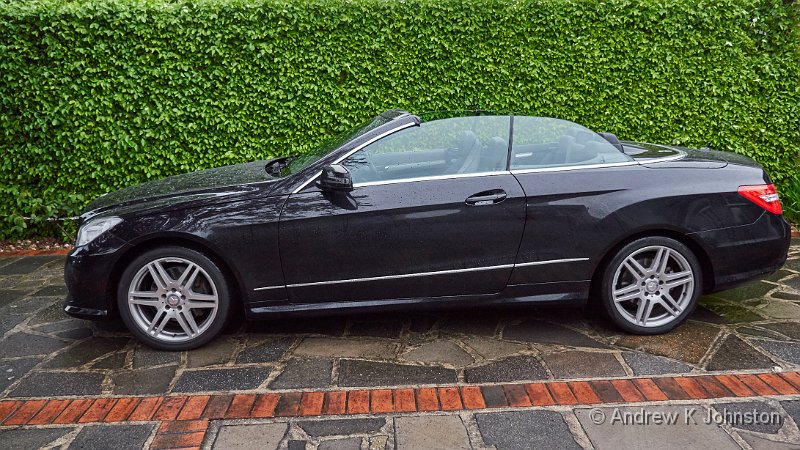
Mercedes-Benz E Class Cabriolet E 350 CDI Blue Efficiency AMG Sport 125. Phew!
Camera: Panasonic DMC-GH4 | Date: 14-05-2015 20:09 | Resolution: 4367 x 2457 | ISO: 500 | Exp. bias: -66/100 EV | Exp. Time: 1/60s | Aperture: 2.8 | Focal Length: 12.0mm | Lens: LUMIX G VARIO 12-35/F2.8

It has been said that the ideal car for Darth Vader would be an original Mercedes CLS, in black. I think I have discovered the ideal car for Dr. Henry Jekyll, and Mr. Hyde!

Mercedes themselves acknowledge the dual personality of the beast with the space-filling full title of “Mercedes-Benz E Class Cabriolet E 350 CDI Blue Efficiency AMG Sport 125”. Now I may be wrong, but shouldn’t “Blue Efficiency” and “AMG Sport” sort of cancel each other out? Apparently not…

In normal use this is a typical, refined, Mercedes soft-top, very reminiscent of the old 129-series SLs. I was a bit worried before I took delivery that the suspension might be firmer than ideal, but it’s absolutely fine. It’s smooth, stable and quiet, the big Diesel engine hardly audible top up or down.It’s very quick, but doesn’t feel “fast”(even though on main roads you can maintain high speeds very easily), because the throttle response is fairly muted. And, the “Blue Efficiency” bit kicking in, on a long run as long as you keep it under about 85mph you can get around 40mpg, not bad for a heavy car with a 3l engine. Ideal for mild mannered Henry Jekyll.

And then you press the little button marked “SPORT”.

Now I’ve had cars with sport settings before. On the Mercedes SLs and the old Porsche 993 it supposedly made the gearbox a bit more responsive, but I never noticed much difference. On the VW EOS, with its petrol turbo engine there was a noticeable effect if you wanted to drive hard because the different profile meant that the turbo was always spun up and there was no lag, whereas that could occasionally catch you out in normal mode.

This is different. The button should probably be labelled “Dr. Henry Jekyll’s Patent Elixir”, but unfortunately that wouldn’t fit. It seems to signal someone to release a snarling, snorting monster from its cage. In practical terms the car sharpens its steering, firms up the suspension, changes the gearbox profile and dramatically modifies both the throttle response and engine behaviour. I’m not sure whether there’s also a change to the exhaust note, or whether that’s just a side-effect of the engine working harder. The net effect is a bit like having a large, powerful dog pulling you along on its lead – you go from nudging it gently in the rear end in ECO mode to desperately trying to reign it in in SPORT. 0-60 takes just over 6s, but the most noticeable effect is mid-range acceleration, which distinctly betters my last Porsche. Mr. Hyde would approve.

Some cars are soulless, and some have a distinct personality. This has two, and I’m enjoying both of them!

View featured image in Album
Posted in Thoughts on the World | Leave a comment

A Visitation

Hedgehogs in our courtyard
Camera: Panasonic DMC-GH4 | Date: 09-05-2015 21:29 | Resolution: 3833 x 2555 | ISO: 3200 | Exp. bias: 0 EV | Exp. Time: 1/40s | Aperture: 2.8 | Focal Length: 100.0mm | Caption: Hedgehogs in our courtyard | Lens: LUMIX G VARIO 35-100/F2.8

Great excitement chez nous last night. The security lights went on and we spotted not one but two hedgehogs snuffling around in the courtyard. Fortunately they stayed round long enough to get a few photos.

The security light provided good illumination, but kept on switching off (as it’s supposed to), so Frances ran around to wave at it and switch it back on. What was very funny was that each time the light came on, the hedgehogs froze mid-snuffle for about 10 seconds, just as portrayed in Over the Hedge, but which we’d never seen before in reality.

I spotted another one later on when I got up for a glass of water, so hopefully these welcome visitors will become a regular feature.

View featured image in Album
Posted in Photography, Thoughts on the World | Leave a comment

A Failure of Curation

Odd captioning practices at The Photographers Gallery
Camera: Canon PowerShot S120 | Date: 05-04-2015 15:48 | Resolution: 3945 x 2630 | ISO: 200 | Exp. bias: 0 EV | Exp. Time: 1/60s | Aperture: 3.5 | Focal Length: 10.4mm

We visit a lot of photography exhibitions. The majority are inspiring or thought-provoking, and well worth the effort of the photographers, the presenters, and the attendees.

Along the way there has been the odd disappointment: sometimes we just don’t connect with the material, on other occasions we have felt that the volume or quality of the work hasn’t justified a high entrance cost. On one occasion an exhibition presented such a biased left-wing viewpoint that I felt desperate for the injection of some balance.

However today we had a new experience – an exhibition based on a good volume of high quality work, at a great location, which failed abysmally due to comprehensive incompetence in curation.

The offending exhibition was Human Rights, Human Wrongs at The Photographers Gallery. The piece was meant to chart the path of human rights since the Universal Declaration in the 1940s, drawing from a large archive of reportage. It failed.

The main problem was the complete absence of any organising principle. With the occasional exception of sequential shots of the same event, there was no attempt to group items by location, subject, date or photographer. It was just a confusing "bunch of stuff". At times the confusion seemed almost wilful – two related, well explained pictures from Vietnam together on a wall, but separated by a wholly unrelated picture from Chad.

The curators provided copies of original notes on some of the images, but these were presented in tiny type well below the average eye line, underneath the photos. To ensure there was no chance of even this being readable the images had thick frames spotlit from above, so half of each caption was adequately lit, and half in deep shadow. In any event there was no attempt to present any context, explanation or information about what happened next – unless the photographer wrote this on the back of the original you were on your own.

The caption typist had clearly lost the will to live with the highly structured but low information content approach, and even managed to mis-spell "Untitled".

Even the choice of content felt random. There were lots of good pictures of American Civil Rights events in the 1960s. Fine. Plenty of pictures of Martin Luther King Jnr, a portrait of JFK and a nice picture of Nixon with Coretta King. Good. But why have a blurry picture of Lee Harvey Oswald but none of Johnson, Bobby Kennedy or Malcolm X?

The supposed light relief afterwards, pictures of horses on the American prairies, didn’t work either, with captions in about 8pt type several feet away from the related shot, and the beautiful animals captured against wilfully ugly backgrounds.

The Photographers Gallery has a great new location, but they don’t seem to know what to do with it. This is an abuse of our human right to a decent exhibition!

View featured image in Album
Posted in Photography, Thoughts on the World | Leave a comment

Positively On Fire…

Winter light on the pampas grass, chez nous
Camera: Panasonic DMC-GX7 | Date: 11-01-2015 10:45 | Resolution: 4592 x 3064 | ISO: 320 | Exp. bias: 0 EV | Exp. Time: 1/100s | Aperture: 5.6 | Focal Length: 45.0mm | Lens: LUMIX G VARIO PZ 45-175/F4.0-5.6

Apologies, my first blog post of the New Year really should have wished you all the very best for 2015. Please accept this as a pseudo-first post, with said wishes.

I also just wanted to post this shot from yesterday. A low winter sun, passing clouds and unusually upright pampas grass for January combined to generate this remarkable light pattern. As we were just going out of the door this is a grab shot taken leaning out of the bedroom window, but I think the result worked. I hope it’s an omen for things being “on fire” (in a good way) in 2015.

View featured image in Album
Posted in Photography, Thoughts on the World | Leave a comment

Google Bowls a Googly

Here’s a thing. Do a search for a restaurant, theatre or somewhere else you’d like to visit, using Google Chrome. Get a map using Google Maps, in Google Chrome. Print out a copy for reference – blank page!

Copy the URL into Internet Explorer, print out the map. Works…

Posted in Thoughts on the World | Leave a comment