Author Archives: Andrew

Standardising the Mac Keyboard

My MacBook Pro is, ironically, the best portable PC I’ve owned. The Big Old Alien is slightly faster and more powerful, but you’d never use the word "portable" about it without gritted teeth, and since the PC world went to silly wide (=short) screens as standard, nothing else with a 15" screen can match the Apple’s bright, colour-accurate and relatively tall display. The form factor and elegant, strong body suit me very well.

The initial teething problems with accessing external displays resolved themselves when I bought some slightly higher quality display adapters. Ironically the best one for VGA has "Dell" written on it. The multi-touch trackpad works well with Windows as soon as you set the bottom right corner to provide a right mouse click, and the spacing and action of the keypad allows me to type quickly and fairly accurately in a way which isn’t possible on many of the other laptops I’ve owned.

The keyboard layout, however, is a different matter. I’m sure that Apple’s position is that you should just use Apple keyboards all day every day and get used to it, and that the more common layout is a Microsoft/IBM standard anyway. The latter point might be true, but that doesn’t help those of us who operate in a more heterogeneous world. I have to work on PCs as well. About half the time, I use my Mac via Remote Desktop, from a PC with a standard Microsoft Keyboard. Even when I’m working on it directly, and even though I’m not a true touch typist, my muscle memory is sufficiently good that I default to the UK PC positioning of the ", @, \ and # symbols, all of which I use quite frequently. And occasionally Frances gets to use it, and she is a touch typist who uses PCs all the rest of the time.

I therefore decided that something had to change, and that was the Mac! Unfortunately turning it into a "standard" PC layout is non-trivial, but I’m getting there.

The first step was to implement a proper "Delete" key, without which the Mac is unusable in many Windows programs. The solution to that one’s fairly well documented: you use SharpKeys to adjust the registry, and remap a suitable key to send the Del scancode, which is an easily reversible but permanent fix. I chose F12, which is easy to map and in pretty much the same relative position to Backspace as most Windows laptops. I believe it may be possible to use the CD Eject button instead, which would be even better, but I haven’t got that working yet.

The next layer is the Windows keyboard definition. Microsoft provide a free utility called the Microsoft Keyboard Layout Utility, which allows you to define the mapping for the main text keys. The advantage of this is that you can define multiple layouts and switch between them on the fly, if, for example, you work in several languages. I initially tried having the Apple layout, plus one based on a standard UK keyboard. This works tolerably well, but you can get tripped up if you haven’t switched the layout correctly, as you have to switch the keyboard separately for each application used in a login session. It also doesn’t resolve the problem of muscle memory on the Mac. Something more enduring was required…

I decided it was time to try and sort out the MacBook keyboard more directly. It’s relatively easy to pop the keycaps off and swap the standard text ones around. First change is to swap the \| key with the ~ key, which puts them into their correct positions for PC users, and remap their output in a copy of the Apple keyboard layout. While I was at it I remapped the non-shifted character on the ~ key from a grave accent to a # – consistent with PC keyboards and about 1 million times more useful in this hash-tagging world!

Apple’s approach to the quote keys appears to be wilfully obstructive. All European keyboards since the age of typewriters, including British ones, put the double quote above the 2. So do older American keyboards. However the US IBM Selectric typewriters put the @ above the 2 and the double quote above the single quote, and that became the standard for US PC keyboards. For reasons which I can only assume are due to an arrogant American company trying to impose American standardisation on others the UK MacBook keyboard follows US rather than standard UK practice. Fortunately they don’t impose the same change on the rest of Europe, so a partial solution presents itself by purchasing a replacement 2/" key for a German machine (from the excellent http://www.thebookyard.com), and swapping the outputs of the two shifted keys in the keyboard mapping file.

At this stage I have a single keyboard map which works with both the native keyboard or a PC one, and outputs all the symbols I regularly use on PC rules. The majority of keys on the MacBook keyboard also follow their labels. There are two exceptions: the @ key is generated by shift+quote as expected, but not shown on the key, and the same goes for the #, as the base symbol on the ~ key. Unfortunately as far as I can see there are no variants of the MacBook keyboard for any country which have these key combinations, so getting replacement keycaps is not an option. However I can probably live with this limitation.

The one remaining annoyance is the fact that the Fn and Ctrl keys are the opposite way round on the Apple keyboards to most PCs. That’s a bit of a problem with muscle memory for Ctrl+key shortcuts. However I’m gradually training myself to hit the standard PC Ctrl key on its right edge, which is almost the right position for the Mac Ctrl key as well. The real fix is to develop a new keyboard driver which swaps those keys altogether, and then swap the key caps. That’s not for the faint hearted, and I’m not going there unless I have to (and have lots of spare time).

There’s one more layer! Smile Some of my software (particularly XnView, which I use for image management) uses the numeric keypad, which doesn’t exist on the MacBook (one of the big advantages of the Alienware M17X being so enormous!). However that has a relatively quick fix, using AutoHotkey to temporarily map the equivalent keystrokes from the standard number keys. This has the advantage that I only need to have those changes in place on demand, and can tweak the mapping on the fly if needed.

It’s a complicated process, and definitely not standard end-user territory, but I’m nearly there!

Posted in PCs/Laptops, Thoughts on the World | Leave a comment

Schizo!

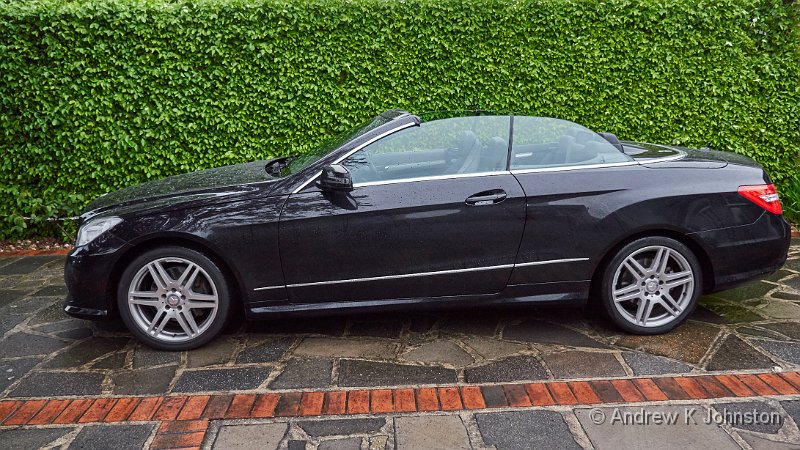
It has been said that the ideal car for Darth Vader would be an original Mercedes CLS, in black. I think I have discovered the ideal car for Dr. Henry Jekyll, and Mr. Hyde! Mercedes themselves acknowledge the dual personality Continue reading

Friday, May 15, 2015 in Thoughts on the World

Lotsa Changes!

I’ve taken advantage of a bit of spare time to sort out our web sites, and in particular fix a few things which didn’t work quite right after our enforced emergency upgrade in February. Hopefully you should see everything working Continue reading

Thursday, May 14, 2015 in Website & Blog

A Visitation

Great excitement chez nous last night. The security lights went on and we spotted not one but two hedgehogs snuffling around in the courtyard. Fortunately they stayed round long enough to get a few photos. The security light provided good Continue reading

Sunday, May 10, 2015 in Photography, Thoughts on the World

A Failure of Curation

We visit a lot of photography exhibitions. The majority are inspiring or thought-provoking, and well worth the effort of the photographers, the presenters, and the attendees. Along the way there has been the odd disappointment: sometimes we just don’t connect Continue reading

Sunday, April 5, 2015 in Photography, Thoughts on the World

Normal Service Being Resumed

Apologies to all for the interruption to our websites and email service around last weekend. My server was hacked and used to launch DDoS attacks, and had to be taken offline and rebuilt with the latest software versions. Fortunately I Continue reading

Saturday, February 28, 2015 in Website & Blog

Efficient Fuzzy Matching at Word Level

I’ve just solved a tricky problem with what I think is quite an elegant solution, and thought it would be interesting to share it. I’m building a system in which I have to process fault data. Sometimes this comes with Continue reading

Friday, January 16, 2015 in Agile & Architecture, Code & Development

Positively On Fire…

Apologies, my first blog post of the New Year really should have wished you all the very best for 2015. Please accept this as a pseudo-first post, with said wishes. I also just wanted to post this shot from yesterday. Continue reading

Monday, January 12, 2015 in Photography, Thoughts on the World

Monochrome, Sort Of…

I’m making use of my new Windows MacBook to catch up with photo processing, including a few shots from our trip to Barbados last year. One of the things I particularly love about the Caribbean are the splashes of colour Continue reading

Wednesday, January 7, 2015 in Barbados, Photography, Travel

Google Bowls a Googly

Here’s a thing. Do a search for a restaurant, theatre or somewhere else you’d like to visit, using Google Chrome. Get a map using Google Maps, in Google Chrome. Print out a copy for reference – blank page! Copy the Continue reading

Monday, December 29, 2014 in Thoughts on the World

More Panoramas!

The astute among you will have noticed that I place a random panorama in the masthead of all my web site pages. I’ve just refreshed my album with a number of new images, which I hope you’ll enjoy. Continue reading

Wednesday, December 17, 2014 in Website & Blog

The Last Link in the Chain

Day 10 We start by driving back to the Linn Cove Viaduct, the last piece of the Parkway finally put in place in 1987. It’s a great feature in its own right, but there’s also some very colourful foliage on Continue reading

Thursday, December 4, 2014 in Travel, USA 2014