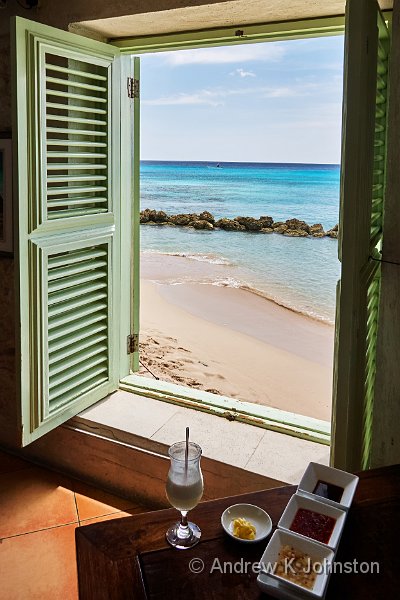
| Central image reprocessed with 2026 software | |
| Camera: Canon EOS 40D | Lens: EF-S17-85mm f/4-5.6 IS USM | Date: 28-04-2008 17:09 | Resolution: 2491 x 3737 | ISO: 200 | Exp. bias: 0 EV | Exp. Time: 1/40s | Aperture: 11.0 | Focal Length: 17.0mm (~27.6mm) | Lens: Canon EF-S 17-85mm f4-5.6 IS USM | |
My photography mentor, Bob Kiss, recently posted an image of his, taken in Tuscany, of a Tuscan field scene shot through a window, with the light carefully balanced so that you can clearly see both the exterior, and the interior around the window. It immediately reminded me of a not dissimilar shot I took many years ago, at the Fish Pot in Barbados.
While Bob’s shot is relatively recent, and took advantage of modern sensor technology and computational corrections, mine was taken using the Canon 40D. That was a 10 megapixel beast new in 2007, which offered what should charitably be described as a somewhat limited dynamic range, so I had to expose three bracketed shots, and combine them using HDR software. This was the result:
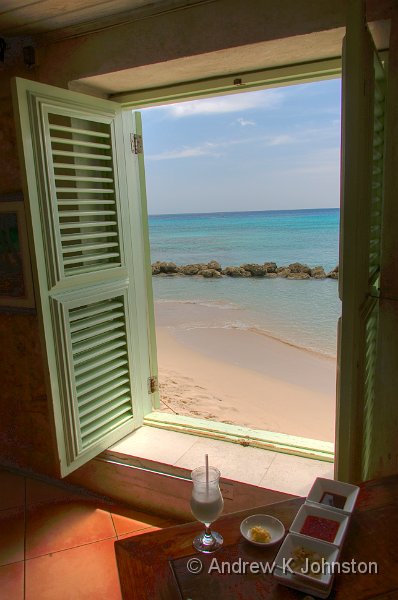
| Original HDR image (Show Details) |
The 40D was an APS-C format camera and at the time my best “normal” lens was the 17-85mm, equivalent of about 27mm at the wide end. This forced upon me a less than ideal high shooting position which generated a geometry with diverging verticals. Fortunately even in 2008 Photoshop could do a suitable geometric correction which at least straightened up the window and horizon:
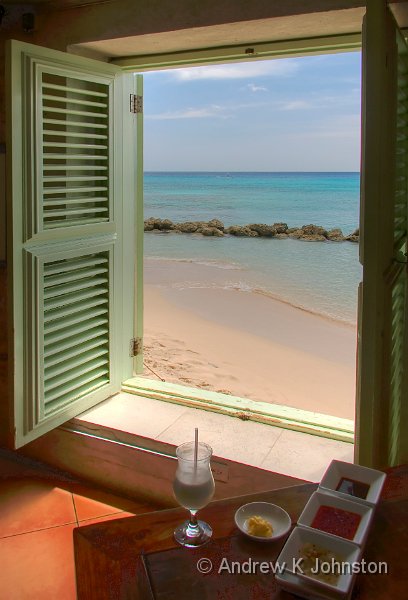
| Adjusted HDR Image (Show Details) |
That’s not bad, but if you look carefully you can see that the image has a typical “early HDR” feel, with soft details, muddy colours, and noticeable coloured fringes along sharp edges courtesy of the 17-85mm’s significant chromatic aberration. Bob’s post therefore got me thinking about how my image might look with modern processing.
Fortunately I had kept the original RAW files, so it was the work of moments to open them up in Capture One. The latter immediately improves matters with its “HDR” shadow and highlight recovery, and allows me to work with just the central image of the bracketed set, so goodbye to composite HDR. Capture One also has correction for the lens’s chromatic aberrations, and allows me to apply the required geometric correction non-destructively. This is the output image:
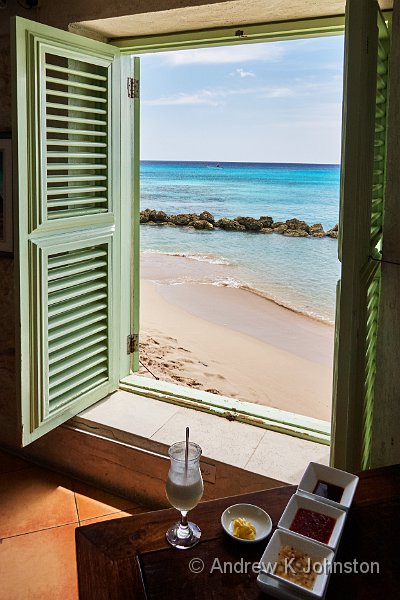
| Central image processed with Capture One (Show Details) |
That’s a major step forward. However pixel peeping reveals that the image is still not as sharp as would be ideal, and despite being shot at ISO 200 has noticeable noise in the darker areas. There’s also the compositional issue of the power socket half visible behind my Pina Colada. Fortunately we can also pass the image through Topaz Photo AI. It volunteered sharpening, and I also applied its denoise technology. I then went into its “remove” function and highlighted the half socket. This is the result:
| Central image reprocessed with 2026 software (Show Details) |
I love the way this “pops”, and we’ve got rid of the compositional compromises. I’d be happy with this image if I took it today with a modern camera and much more expensive lens. Ideally I would actually have to hand a wider lens which would allow me to get the whole of the right shutter in shot, but I can live with it.
This is great news for cases like this, but it’s amazing news for cases where the old image can no longer be recreated, because the people or architecture have moved on. So if you have in your collection images of which you’re fond but which are technically limited, and you still have the RAW files, try reprocessing them. The results may be wonderful.


 Email me
 Others
 Thoughts on the World (Main Feed)
 Main feed (direct XML)