 - A Software and Hardware Reliability Modelling Tool
RelQuest is a tool to support Fault Tree Analysis of hardware and software system reliability. It is based on a simplified modeling approach, which allows analytical (and therefore almost instantaneous) evaluation of the model. It supports base events, AND, OR and VOTE gates.
RelQuest is implemented as a Visio™ Add-In, consisting of one stencil, template and DLL. It will function with Visio 2002 SR-1 or later.
Example Model
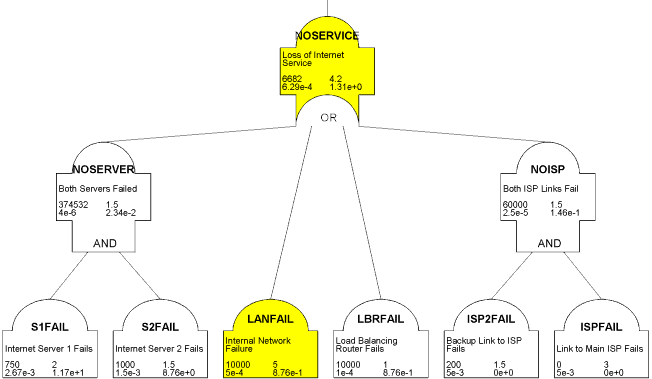
The following example shows a possible analysis for an Internet service which has two servers (with slightly different reliability histories), a load balancing router and two connections to the Internet, one primary and a backup:
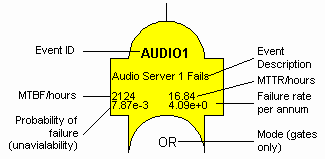
Each base event and gate icon shows the following information:
Thus the above analysis shows that our example Internet service will have a mean time between failures of about 6700 hours (or about 39 weeks), and a mean time to recover of about 4 hours. The cells highlighted in yellow show the most critical elements of the model (in this case the risk of internal LAN failure), which suggest where to concentrate on improvements.
Using RelQuest
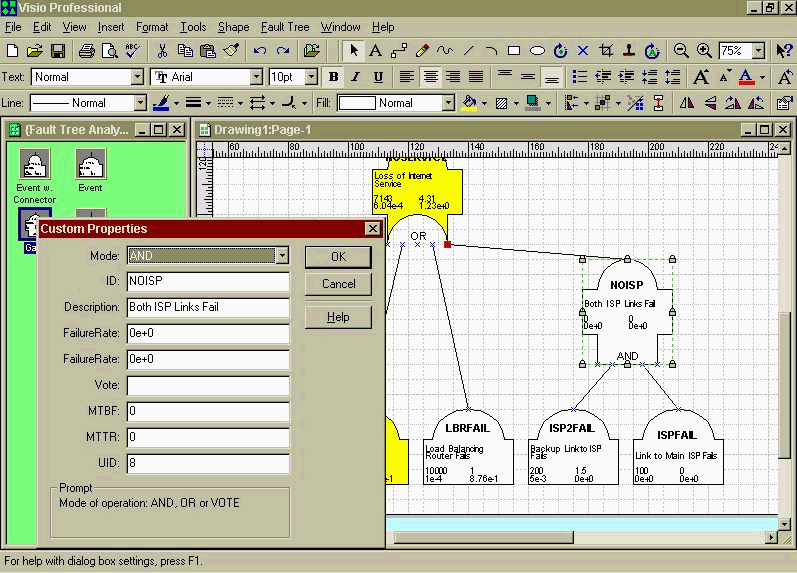
A model is built in Visio by simply dragging and dropping elements from the stencil onto the drawing, double-clicking to set the name, description and reliability figures, and linking the elements by dragging their connectors to the object above. (Click to see a screenshot showing this in progress.)
The models dynamically recalculate as you connect shapes or change their properties, or you can force recalculation at any time by right-clicking on a shape and choosing "ReCalculate". Recalculation times are a few seconds (compared with tens of minutes for some simulation-based tools). The model highlights the highest-probability path from the top gate in yellow, and any problems (e.g. where the parameters have not yet been set) in red.
The models can be cut and pasted directly into other documents, and edited in place in any OLE container (e.g. Microsoft Word).
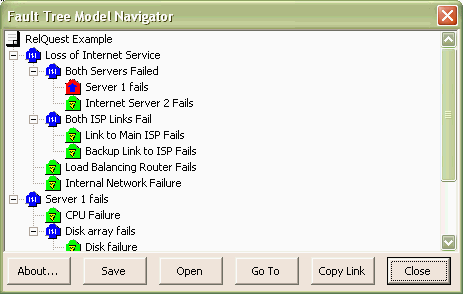
Large models are supported by the concept of "transfer gates", which allow the values of a gate in one drawing to be "live linked" to an event in a higher-level model. A navigator window shows the content of the model and the links between drawings graphically:
Purchasing RelQuest
The shareware version is limited by the number of shapes you can include in the model - functionality is restricted for models with larger numbers.
Relquest is not currently on sale, but if you are interested please contact me.
All use of RelQuest is subject to a Licence Agreement.
Please note: the registration code must be entered with a Fault Tree diagram loaded (an empty one will do). You will get an error message with number 91 if you try to enter it from the Visio startup page.
 Email me
 @TweetAndrewJ
 Others
 Thoughts on the World (Main Feed)
 Main feed (direct XML)